

The Internet Banking application https://btpay.bancatransilvania.ro/ hereinafter called BT Pay Web, is the property of BANCII TRANSILVANIA S.A (hereinafter called "the Bank" or "BT"), a credit institution, a Romanian legal entity with its registered office in Cluj-Napoca, Calea Dorobanților street, no. 30-36, Cluj, phone 0264 308028, registered at the Trade Registry under no. J1993004155124, having the unique registration code RO 5022670.
BT Pay Web Internet Banking Application is the property of Transilvania Bank S.A. and uses cookies.
The information presented below aims to inform you about what cookies are, as well as about their placement and use by BT Pay Web.
In case you need more information about cookies, and these are not found in this Policy, you can write to us at the e-mail address contact@btrl.ro or you can call the phone number of the BT Contact Center service - 02648028 (or *8028). Regarding the processing of personal data in the context of cookie usage, you also have the possibility to contact the data protection officer (DPO) appointed by BT, at the e-mail address dpo@btrl.ro.
What is a "cookie"
What is a "cookie"
Cookies are small files, made up of letters and numbers, stored by the browser you use to have a better Internet browsing experience. These files allow a website to recognize a user's device. They contain information that links a web page user to a web server (the website). If a user accesses that website again, the web server will read the previously stored information.
A cookie will not adversely affect your computer, mobile terminal, or other devices and will not store information for identification purposes.
A cookie consists of 2 parts: the name and its content or the value of the cookie. The lifespan of a cookie is determined; technically, only the webserver that sent the cookie can access it again when a user returns to the website associated with that webserver.
Through the settings made in the browser you use to surf the Internet, you can allow or block the launching of cookies. Cookies cannot be used to run programs or transmit computer viruses.
By using cookies, you will benefit from a better browsing experience.
BT Pay Web Internet Banking Application https://btpay.bancatransilvania.ro/ uses session cookie modules (stored in memory) and persistent ones (placed on the hard disk). Persistent cookie modules are written in the Cookies folder under the user profile folder or the WINDIR\Cookies folder.
BT Pay Web Internet Banking Application https://btpay.bancatransilvania.ro/ does not store personal information. Cookies used in this application are used only for technical purposes, strictly related to the functioning of the application (remembering the language chosen by the user when accessing the application, maintaining a stable and secure session, etc.), which is why blocking them leads to the inability to use it.
What types of cookies does it use
What types of cookies does it use
BT Pay Web Internet Banking Application? The BT Pay Web Internet Banking Application uses session and permanent cookies, as well as proprietary cookies, for the following purposes:
1. Strictly necessary cookies
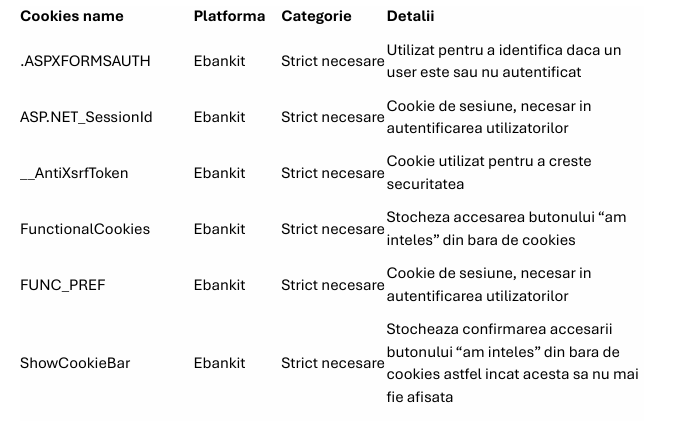
These cookies are necessary for the operation of the BT Pay Web application and cannot be disabled in our systems. They are usually set only in response to actions taken by visitors of this application, whereby they request various services such as setting privacy preferences, authentication, or filling out forms. In the browser they use, visitors (users) can set blocking or receiving a warning about these cookies, but in this case, certain parts of the application may not function.
These types of cookies are exempt from the rule of obtaining consent for their placement.
2. Functional cookies
These cookies allow the optimal or, where appropriate, customized functioning of certain sections in the BT Pay Web application, such as live chat and visual assistance. These cookies may be set by us or by our partners, whose services we have added to the application. If you do not allow access to these cookies, the chat and visual assistance will not work.
List of these cookies and the identity of third parties that place them can be found in the following list:
How can you control cookies
How can you control cookies
You can change the cookie settings on BT Pay Web (except for strictly necessary cookies) by accessing the Cookies Settings menu. This can be found both in the cookie banner of the BT Pay Web Internet Banking application and in its footer. At the same time, you can also set the browser you use to block any types of cookies, including necessary ones.
We draw your attention, however, that in such a situation, the websites you visit (including the BT Pay Web Internet Banking application) might not function properly. If you want to block cookies, please make the following settings in the Internet browser you use:
Google Chrome:
- click on the key icon and select Options from the list
- click on the "Advanced Settings" tab
- click on Content Settings in the Privacy section
- choose the settings you want
- click on X to close.
Mozilla Firefox:
- select Tools from the main bar, then Options
- click on the Privacy tab
- choose the settings you want
- click on OK to close.
Internet Explorer:
- click on the Settings / Tools icon
- click on Internet Options
- click on Privacy and then choose the options
- click on Apply and then OK to save preferences.
Security and privacy-related aspects
Security and privacy-related aspects
To avoid computer attacks based on cookies, we recommend that you ensure the browser version you are using is always up to date.
The data collected by cookies are generally anonymous. In cases where cookies process personal data, you benefit from the rights provided in the Privacy Policy of Banca Transilvania, which you can find at the following link: https://www.bancatransilvania.ro/politica-prelucrare-si-protectie-date-personale/.