This page is automatically translated from Romanian into English.

  • Business
  • Investor Relations
  • Call Center
  • Call Center status meter dynamic emoji
    High waiting time!

    Currently, we are receiving a very large number of calls at the Call Center. If you have an urgent problem, call now, and if not, we will wait for you later. For quick answers, try Question BT - opens in a new tab or BT Visual Help - opens in a new tab.

  • 0264 308 028 or *8028The number is available from any national network. Standard rate.
    0264 303 003Direct line for all Romanians who have left the country, including assistance in English. Standard rate.
    Fraud assistance
    In case you suspect fraud on your account, call quickly at 0264 308 055. Normal rate.
    BT AI Chat logo - opens in a new tab

    AI Search from Ask BT answers all your banking questions.

    - opens in a new tab

    See your account details quickly, call 0264 308 000 and you receive an SMS with the access link.

    You have reached the end of the results
    No results found

    Has your card expired or is it going to expire this month?

    See what options you have to receive it.

    Steps to request a digital card

    Your new issued card will be prepared in its digital form in the BT Pay application, starting with April 15. What do you need to do?

    1

    You enter the BT Pay application.

    If you don't have the BT Pay application, you can download it now for free.

    2

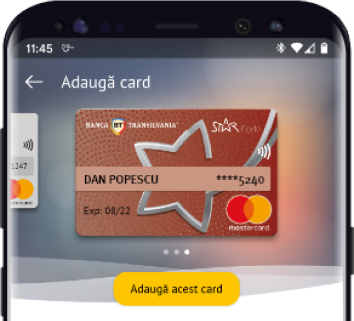
    You follow the card addition steps.

    You press the 'Add card' button, and a confirmation SMS will be sent automatically to your phone number.
    3

    You enter the code sent into the application.

    And that's it, you have the new card. If you want to use it for online payments, access the card details button and follow the steps to see the card number and CVV code.